Nextiva Number Porting Service
As Nextiva continues to innovate, MySecondLine is here to keep you connected!
- Sign up for MySecondLine
- Submit your Nextiva account info
- Purchase and transfer to MySecondLine
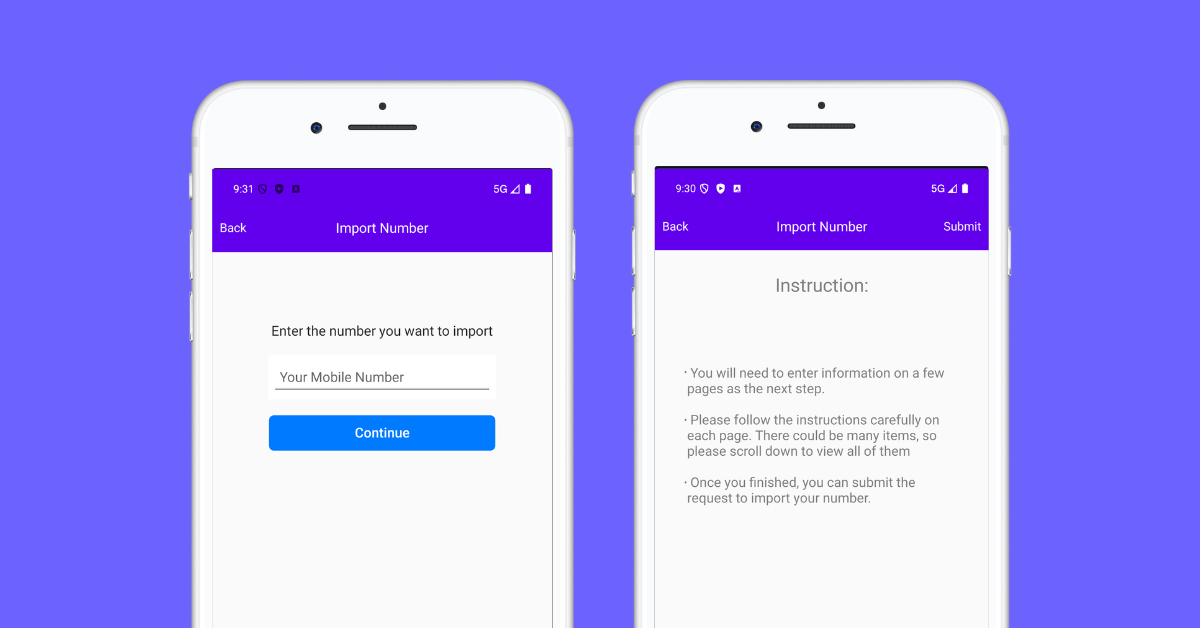
As Nextiva continues to innovate, MySecondLine is here to keep you connected!
Porting your number from Nextiva is easy and straightforward. Keep your contacts and avoid the hassle of updating everyone with a new number.
Port your Nextiva number to our app effortlessly. No SIM card, no contracts—just lower costs and more flexibility.
Bring your Nextiva number and keep your personal life separate. Enjoy enhanced privacy and no disruption to your existing calls or messages.
Travel without limits. Use your ported number abroad with no roaming fees, no SIMs, and no need to stay tied to Nextiva.
Verify if your current number can be ported from Nextiva by using our eligibility checker tool.
Collect your Nextiva account details, including account number, PIN, and billing address.
Complete our online porting form with your information and pay the one-time porting fee.
We'll handle the transfer process with Nextiva. You'll be notified once the porting is complete.
Follow these steps to request your account details from Nextiva
Found on your bill or online account.
Provided by Nextiva during the unlock process.
Complete and submit to authorize the number transfer.
Billing telephone number, account owner's name, and billing address must match Nextiva records exactly.
Important: Ensure all information matches your Nextiva account records accurately to prevent issues during the porting process.
Our Integration Partners
"I didn’t want to lose my Nextiva number, and this app let me keep it without any hassle. Everything transferred smoothly, and now I’m enjoying more features for less cost. Extremely satisfied!"
, Texas, USA
Nextiva is a leading provider of cloud-based business communication solutions established in 2008. It offers voice, video, and team collaboration tools.Recognized for its exceptional service, Nextiva simplifies business communications, helping companies to manage their customer relationships and internal communications from anywhere.A standout feature of Nextiva is its business phone numbers, which support seamless porting and integration, ensuring businesses remain connected without interruption.
Global Reach
Secure Communications
Cost Effective
Take the first step toward a more flexible communication solution